You fixed retrieval. You tuned the prompts. You indexed the knowledge base. The agent still issued a refund it wasn’t authorized to make, called an API with the wrong credentials, and skipped the escalation path your runbook defines in plain English.
The model understood the request. It even sounded confident. The failure wasn’t reasoning—it was architecture.
Most enterprise AI products today are thin wrappers: user message, RAG retrieval, a bloated system prompt, model call, text response. That pattern works for FAQ bots. It collapses the moment an agent needs to act—query a CRM, open a ticket, trigger a workflow, or make a decision with side effects.
The teams shipping reliable agents in 2026 are not winning on model selection. They are winning on harness design: the runtime shell that wraps the model with persistent rules, on-demand playbooks, and governed tool access.
If context engineering answers what the agent is allowed to know, the agent harness answers what the agent is allowed to do—and how.
The lesson from the IDE
Watch how a modern AI-native IDE operates. It does not send your message directly to a model and hope for the best. It runs a harness—a structured runtime with three distinct layers:
| Layer | What It Does | When It Applies |
|---|---|---|
| Rules | Persistent constraints—coding standards, security boundaries, commit policy, output format. | Always. Scoped globally or by context (file type, project, user). |
| Skills | Procedural playbooks—how to create a PR, run a security review, integrate with a specific SDK. | On demand. Loaded when intent matches, not stuffed into every request. |
| Tool integrations (MCP) | Typed, schema-defined access to external systems—GitHub, issue trackers, observability platforms, databases. | At action time. The model picks from a declared capability surface; it does not invent API calls. |
The harness also owns the agent loop: model proposes an action, the runtime validates it, executes the tool, feeds the result back, and repeats until the task completes or a guardrail fires.
This is not an IDE novelty. It is a product architecture pattern every enterprise building agentic AI should adopt.
Why RAG plus prompts is not a harness
The default enterprise stack looks like this:
User message → RAG retrieval → system prompt → model → text response
It treats the agent as a conversation, not a system. Everything—policies, workflows, tool descriptions, tone guidelines—gets compressed into a single prompt and prayed over.
That approach fails predictably:
- Policy drift: Constraints buried in prompts are ignored under pressure or long context windows.
- Workflow fragility: Business logic lives in application code and prompt text, with no single source of truth.
- Integration chaos: Each team wires ad-hoc API calls; there is no central tool registry, permission model, or audit trail.
- Untestable behavior: You can eval the final answer, but you cannot eval whether the right rules fired or the right tools were authorized.
- No action loop: The system generates text about what it would do—it cannot reliably do it under governance.
A harness replaces this with a platform runtime:
User message
  → policy rules (always)
  → skill selection (conditional)
  → context assembly (retrieval + memory)
  → model (reasoning only)
  → tool broker (validated execution)
  → guardrail checks (pre and post)
  → response or next loop iteration
The model becomes one component in a governed system—not the system itself.
The three harness layers, translated to product
Rules: the governance layer
In the IDE, rules answer: “What must this agent never violate, regardless of task?”
In your product, that is a policy engine—versioned, auditable, scoped:
- Global rules: “Never delete customer accounts without human approval.”
- Role rules: “Support tier-1 cannot access billing history beyond 90 days.”
- Tenant rules: “Acme Corp requires dual approval for refunds over $500.”
- Jurisdiction rules: “EU users trigger GDPR retention policies on all memory writes.”
Store rules as configuration, not prose in a system prompt. Resolve them at runtime: global + role + tenant + task → inject before inference.
This is the behavioral counterpart to the policy layer in context engineering. Context policy governs visibility. Harness rules govern conduct and capability.
Telling an agent “do not issue refunds over $500” in a prompt is not enforcement. It is hope. Rules enforced by the harness before and after every tool call are engineering.
Skills: the procedural layer
In the IDE, skills answer: “When the user wants X, follow this exact procedure.”
They are not facts. They are runbooks: step sequences, decision trees, output templates, escalation paths, failure handling.
| IDE skill | Product equivalent |
|---|---|
| “Create a PR using team standards” | “Process a customer refund” workflow |
| “Run security review on changes” | “Underwrite an insurance policy” workflow |
| “Integrate with the payments SDK” | “Onboard a new vendor” workflow |
Product pattern: Skills become owned, versioned workflow modules:
- Product owns
customer-escalation-v3.2 - Compliance owns
kyc-verification-v1.8 - Operations owns
incident-triage-v2.0
The harness selects skills by intent + role + domain—lazy-loaded when triggered, not dumped into every request. This preserves token budget for reasoning and keeps behavior consistent across teams.
Critical design choice: skills are declarative artifacts with owners, changelogs, and approval workflows—the same rigor you apply to API schemas.
Tool integrations: the capability layer
In the IDE, the Model Context Protocol (MCP) exposes typed tools with schemas: search_issues, create_pull_request, query_metrics. The model selects from a declared surface—it does not hallucinate HTTP endpoints.
In your product, this is the integration plane:
- Every tool has a schema, permission model, and audit log.
- Tools are registered per tenant and per role—not globally exposed.
- Side-effecting tools (refunds, account changes, data exports) pass through approval gates in the harness.
- Connectors wrap CRM, ERP, billing, IAM, notifications, and internal APIs behind a unified registry.
Think of it as an API gateway for agents. You would not let every microservice call every database directly. Agents should not call every backend either.
The harness runtime: what you actually build
The harness is a service, not a prompt template. At minimum, it implements seven capabilities:
| Capability | Responsibility |
|---|---|
| Intent router | Classify the request; select applicable skill(s). |
| Policy resolver | Merge global, role, tenant, and task rules. |
| Context assembler | Invoke the context plane—retrieval, memory, compression. |
| Tool broker | Expose governed tools; validate calls against policy. |
| Agent loop | Plan → act → observe → repeat until done or limited. |
| Guardrails | Pre-flight and post-flight checks on every action. |
| Telemetry | Traces, audit logs, harness-level evals. |
Reference architecture:
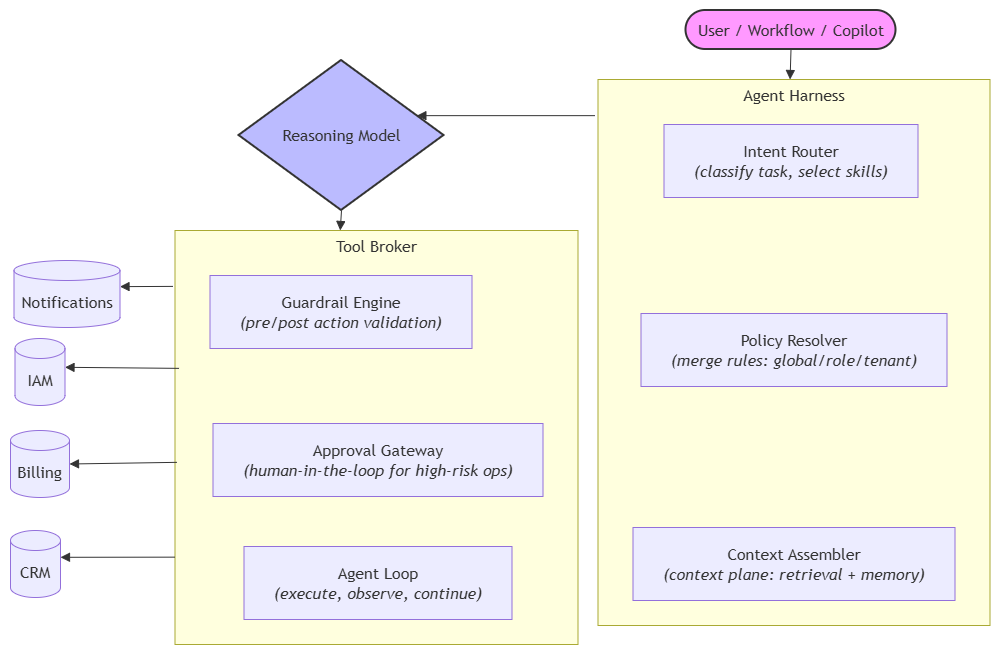 Each box is platform infrastructure—not glue code in a demo chatbot.
The agent loop: the part most teams skip
Reliable agents require a closed loop, not a single inference call:
- Receive user or system intent.
- Resolve applicable rules, skills, and authorized tools.
- Assemble bounded context from the context plane.
- Infer—model returns text or a structured tool call.
- Validate the tool call against policy and permissions.
- Execute via the tool broker—with human approval if required.
- Observe the result; append to working memory.
- Repeat until the task completes, escalates, or hits a safety limit.
Without this loop, you have a chatbot with API keys—not an agent. The harness owns steps 2, 5, 6, and 7. The model owns step 4. Everything else is platform engineering.
A concrete example: B2B support agent
Consider an AI support agent for a SaaS platform:
| Harness layer | Implementation |
|---|---|
| Rules | “Never delete accounts.” “Escalate if ARR > $100K.” “Mask SSN in all outputs.” |
| Skills | refund-processing-v2, password-reset-v1, escalation-triage-v3 |
| Tools | get_account, create_ticket, issue_refund (approval-gated), search_kb, notify_slack |
| Context | Account history, open tickets, SLA tier, recent incidents |
| Loop | Route intent → load refund skill → check policy → call get_account → validate amount → request human approval → call issue_refund → log trace |
The model never “knows” your refund policy as prose it might ignore. The harness enforces it at every step. Compliance can audit the rule version, skill version, tools invoked, and approval chain—without parsing a chat transcript.
Five design principles for CTOs
1. The harness is the product; the model is a component
Stop treating the LLM as the system. It is a reasoning engine inside a governed runtime. Platform teams should own the harness the same way they own the API gateway or identity provider.
2. Separate rules, skills, and tools—never merge them
Rules are constraints. Skills are procedures. Tools are capabilities. Collapsing them into one prompt creates untestable, unmaintainable systems. Each layer has different owners, lifecycles, and eval criteria.
3. Lazy-load everything except rules
Rules apply always. Skills and tool schemas enter context only when relevant. Over-stuffing the prompt window is the harness equivalent of dumping your entire knowledge base into RAG—signal drowns in noise.
4. Enforce at the broker, not the prompt
High-risk actions—refunds, data exports, account changes—must pass through the tool broker with policy checks and optional human approval. Never rely on the model to “decide” whether it is authorized.
5. Build evals for the harness, not just the output
Most eval suites score final answers: helpfulness, tone, accuracy. That is necessary but insufficient.
Add harness evals:
- Given this user and task, were the correct rules applied?
- Was the right skill loaded—and only the right skill?
- Were tool calls authorized for this principal?
- Did side-effecting actions pass through the approval gateway?
- Would an auditor agree this execution trace is compliant?
When harness evals fail, fix the runtime—not the prompt.
How the harness connects to context engineering
These are complementary layers, not competing ideas:
| Concern | Context Engineering | Agent Harness |
|---|---|---|
| Primary question | What may the agent see? | What may the agent do? |
| Core artifact | Context contract | Rule + skill + tool registry |
| Failure mode | Wrong or leaked data in the prompt | Unauthorized or ungoverned action |
| Platform owner | Data platform / context plane team | Agent platform / integration team |
| Eval focus | Retrieval precision, permission boundaries | Rule application, tool authorization, loop integrity |
You need both. Context without a harness produces well-informed agents that still act recklessly. A harness without context produces governed agents that reason over garbage.
Strategic implications for technology leaders
For platform teams: The agent harness is your next shared infrastructure bet—analogous to API gateways in the microservices era. One runtime, many domain-specific skills and tool sets.
For security and compliance: The tool broker is where unauthorized actions happen—or are prevented. Invest in policy enforcement and audit trails here before expanding agent autonomy.
For product leaders: User trust correlates with predictable, bounded behavior—not model brand. A smaller model behind a strong harness outperforms a frontier model with ad-hoc integrations.
For engineering orgs in the Orchestrator model: Your engineers’ artifacts are no longer just code and context contracts. They are skills—declarative workflows that define how agent fleets execute in their domain. Review and version them accordingly.
A pragmatic roadmap
Phase 1 — Rules and tool registry (0–90 days)
- Extract policies from system prompts into versioned rule config.
- Stand up a typed tool registry with authZ and audit logging.
- Implement basic pre/post guardrails on tool calls.
- Add harness telemetry: rules applied, tools invoked, approvals requested.
Phase 2 — Skills as platform artifacts (3–6 months)
- Convert top workflows into versioned skill modules with named owners.
- Build intent routing to lazy-load skills by domain and role.
- Connect the harness to your context plane for unified context assembly.
- Introduce harness evals in CI/CD alongside output evals.
Phase 3 — Shared harness platform (6–12 months)
- One runtime consumed by support, sales, ops, and internal tools.
- Tenant-specific rule overrides and tool registration.
- Human-in-the-loop approval gateway for high-risk actions.
- Full execution traces linked to compliance and audit reporting.
Phase 4 — Ecosystem extension (12–18 months)
- Expose governed tool endpoints to partner and supplier agents.
- Skill marketplace internal to the org—teams publish and consume workflows.
- Cross-agent orchestration: multiple specialized agents coordinated by a meta-harness.
The uncomfortable truth
The IDE vendors figured this out first because they had to. A coding agent that hallucinates API calls or ignores project conventions is unusable within minutes. So they built rules, skills, tool protocols, and agent loops—not as features, but as foundational architecture.
Enterprise product teams are now hitting the same wall at scale. The demo chatbot worked. The agent that processes refunds, modifies records, and triggers workflows does not—because nobody built the harness.
The model wars are commoditizing. The harness war is just beginning.
Companies that ship agents as “RAG plus a good prompt” will keep losing trust in production—one unauthorized action at a time.
Companies that treat the harness as core product infrastructure will ship agents that are bounded, auditable, and actually authorized to act on behalf of the business.
Context engineering determines what your agents know. The harness determines what they can do with it.
Does your agent architecture separate rules, skills, and tools—or is everything still buried in a system prompt? Are you evaluating final answers, or evaluating whether the harness allowed the right actions?
Comments
Have a question or a different perspective? Add a comment below.